Cocoa Casino Mobile: Play Anywhere Without Downloading an App

Cocoa Casino runs fully in your mobile browser - no APK, no App Store. Open the site on iOS or Android, log in and start playing instantly. All 160+ mobile-optimised games, bonuses and payment options work identically on desktop and smartphone. The platform runs on HTML5 with 98.7% uptime, so disconnections mid-session are rare even on a weaker signal.

Triple your first deposit · 100 spins
Join Nowwith bonus

Why the Mobile Version Beats a Dedicated App

Dedicated apps need updates, storage space and app-store approval. Cocoa Casino's browser-based approach removes all three friction points. You visit the site, the page loads, and you play - same session, same balance, same bonuses as on desktop.

The platform is built on Rival Gaming infrastructure with full HTML5 support. Every slot, live table and payment screen is responsive: layouts adapt from a 6-inch phone to a 13-inch tablet without zooming or horizontal scrolling.

Key technical facts:

  • Uptime: 98.7% measured across all devices
  • Supported browsers: Chrome, Safari, Firefox, Opera on both iOS and Android
  • No storage required - nothing is installed on your device
  • 256-bit SSL encryption active on every mobile session
  • RNG audited quarterly; average RTP across all games is 97.5%

The result: you get a stable, verified gaming environment without touching your phone's storage or waiting for an update to download.

Play Now at Cocoa Casino

Mobile Features Worth Knowing Before You Start

Interface and Navigation

The mobile lobby mirrors the desktop sidebar categories: All Games, Exclusives, Favourites, Live, New, Scratch and Win, Slots, Table Games, Top, Video Poker and Special Games. A search bar and provider filter sit at the top of the game grid - useful when you want a specific Rival iSlot or a BetSoft 3D title quickly.

The retro red-and-brown colour scheme scales well on AMOLED and LCD screens. Page load is noticeably fast even on 4G connections because the design is lightweight by intention.

Bonuses Available on Mobile

Every promotion listed in your account works on mobile without a separate bonus code. That includes:

  • Welcome bonus: 200% match plus 100 free spins on Plucky Lucky (min. deposit 20 EUR)
  • No-deposit bonus: 50 free spins on Zeus Thunder Fortunes after registration
  • Crypto bonus: 300% match with code 300BTC (min. deposit 25 USD, wager 38x deposit plus bonus)
  • Daily cashback: 10%-30% of net losses depending on VIP level, credited the next morning

Wagering requirements do not change on mobile. The 50x wager on the no-deposit bonus and the 30x-35x wager on the welcome bonus apply regardless of the device you use.

Security on Mobile

The same 256-bit SSL that protects desktop transactions covers every mobile request. Sessions are tied to your account credentials; there is no separate mobile login. If you are on a shared network, use a private browser tab and log out after each session - standard practice for any financial platform.

All promotions, VIP points and payment options at Cocoa Casino are fully accessible from a mobile browser. You do not need a separate account or a special mobile bonus code.

How to Open Cocoa Casino on Android

Because there is no APK to sideload, setup on Android takes under a minute:

  1. Open Chrome or Firefox on your Android device.
  2. Type the Cocoa Casino URL into the address bar.
  3. Tap 'Add to Home Screen' from the browser menu - this creates a shortcut that opens directly to the lobby.
  4. Log in with your existing credentials or register a new account.

No need to change 'Unknown sources' settings, no permissions beyond the browser's standard network access, and no storage impact beyond the browser cache.

If the page does not load, check that your browser is up to date and that your network does not block gambling sites (some mobile carriers apply regional filters - switching to Wi-Fi or a different network resolves this in most cases).

Minimum Requirements for Android

Requirement Minimum
Android version 6.0 or later
Browser Chrome 80+, Firefox 75+
RAM 2 GB
Internet 3G stable; 4G recommended for live tables
Storage No installation - only browser cache
Register at Cocoa Casino

How to Open Cocoa Casino on iOS

Safari is the default and works without any configuration. Steps:

  1. Open Safari on your iPhone or iPad.
  2. Navigate to the Cocoa Casino site.
  3. Tap the Share icon, then 'Add to Home Screen' - the casino icon appears on your home screen alongside native apps.
  4. Tap it to launch the site in a full-screen Safari session without the address bar.

This is effectively a Progressive Web App (PWA) experience: the browser stores session data so you do not have to re-enter your login every time, and notifications can be enabled through Safari settings if you want to receive promotional alerts.

Minimum Requirements for iOS

Requirement Minimum
iOS version 12.0 or later
Browser Safari 13+, Chrome for iOS
RAM 2 GB (iPhone 6s or newer)
Internet Wi-Fi or 4G LTE

Registering a New Account from Your Phone

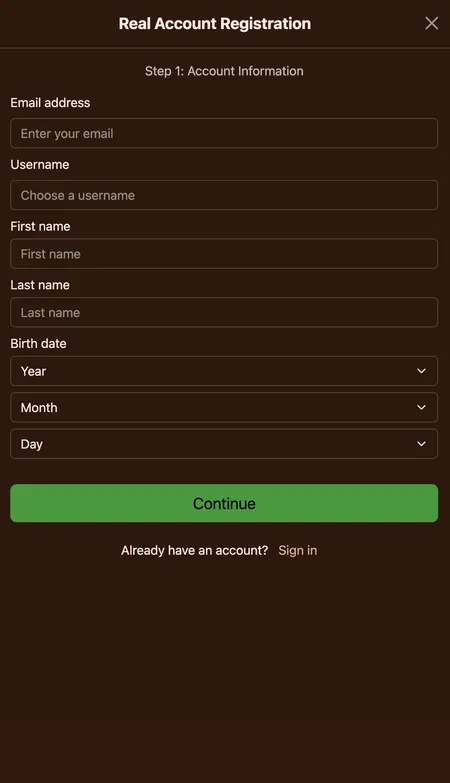
The two-step registration works identically on mobile. The form is single-column on small screens, which makes it easier to fill in on a touchscreen than a multi-column desktop layout.

Step 1 asks for your email, username and a password. Step 2 asks for your address, country and phone number. The whole process takes under three minutes.

Important details:

  • One account per person; duplicate accounts lead to verification delays
  • Minimum age: 18 years
  • After registration, confirm your email to activate the no-deposit bonus (50 free spins)
  • Documents for KYC (passport or driving licence plus proof of address) can be uploaded directly from your phone camera via the account panel

If you already have a Cocoa Casino account, just tap Login in the top-right corner of the mobile site.

Cocoa Casino registration first step on mobile

Step 1 of the Cocoa Casino registration form: email, username and account details. The form fits a single phone screen without horizontal scrolling.

Create Your Account

Logging In and Managing Your Profile on Mobile

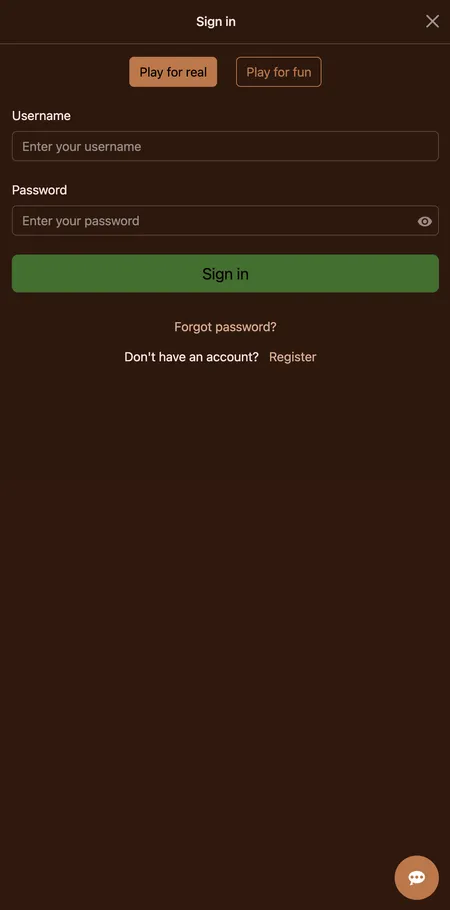
The Login button sits in the top-right corner of the mobile site, the same position as on desktop. Enter your email and password; if you have forgotten your password, tap 'Forgot Password' and a reset link arrives in your inbox.

Inside your account panel you can:

  • Check real-money balance and bonus balance separately
  • View transaction history and bet history
  • Deposit and withdraw without switching to desktop
  • Activate bonus codes
  • Set deposit limits and session timers for responsible gambling
  • Monitor COMP points (1,000 points = 1 USD, no additional wager required)

Two-factor authentication via a separate 2FA app is not confirmed for Cocoa Casino; the standard protection is password plus email verification.

Cocoa Casino login form on mobile browser

The login screen loads instantly in any mobile browser. Email and password fields plus a password-reset link below.

Games Available on Mobile

160 titles are confirmed for mobile play. The categories available from a phone include:

Category Examples
iSlots (Rival) Japan-O-Rama, At the Copa, Quest for the Grail
Video Slots Mighty Aphrodite, Mystic Wolf, Ten Suns
Progressive Jackpots Major Moolah, One Million Reels BC
BetSoft 3D Slots Blood Eternal, Magic Shoppe, Tanzakura
Live Casino Blackjack, Roulette, Baccarat (Fresh Deck Studios)
Table Games European Roulette, Baccarat, Craps
Video Poker Jacks or Better, Deuces Wild, Tens or Better
Specialty 90 Ball Bingo, Keno, Scratch and Win

Demo mode is available on almost all slots directly from the mobile browser - useful for testing the mechanics of a new Rival iSlot before committing real money. For more details about the full game library, visit the Cocoa Casino games section.

Mighty Aphrodite slot mobile
Mighty Aphrodite
Rival Video Slot
Play
Mythic Wolf slot on phone
Mythic Wolf
Rival Video Slot
Play
Sugar High slot mobile view
Sugar High
Rival Slot
Play
Big Cash Joker slot
Big Cash Joker
Rival Slot
Play
Luck of the Irish slot
Luck of the Irish
Rival Slot
Play
Win Up slot on mobile
Win Up
Rival Slot
Play

Browse All Mobile Games

Payments from Your Phone

Every payment method available on desktop works in the mobile browser. No separate mobile wallet or additional verification is needed.

Method Min Deposit Min Withdrawal Speed
Visa / Mastercard 25 GBP 100 USD 3-5 days
Skrill / Neteller 10 GBP 100 USD 24-48 hours
Paysafecard 5 GBP - Instant
Bitcoin 25 USD 100 USD 1-24 hours
Ethereum / Litecoin / USDT 25 USD 100 USD 1-3 days

Weekly withdrawal limit: 500 GBP for standard accounts. VIP players can request up to 10,000 USD per week. Withdrawals go through a 24-48 hour pending period before processing; crypto withdrawals are typically the fastest after that stage.

Visa and Mastercard deposits carry a 3% processing fee. E-wallets and crypto have no deposit fee from Cocoa Casino's side, though network fees may apply on crypto transactions.

PayPal is not available at Cocoa Casino on any device. The weekly withdrawal limit is 500 GBP for regular accounts - plan your session budget accordingly.

Keeping the Mobile Site Updated

Because there is no installed app, there is nothing to update manually. When Cocoa Casino pushes a platform update, you get it automatically the next time you open the site in your browser. Clearing your browser cache occasionally helps if you notice display glitches after a major update.

If a game stops responding mid-session, close the browser tab and reopen the site. Your balance is saved server-side; any interrupted free spins round will resume when you reopen the game.

Ready to play? Cocoa Casino is open in your mobile browser right now - no download, no waiting. Register in two minutes and claim your welcome bonus.

FAQ: Cocoa Casino Mobile

Is there a Cocoa Casino app to download?

No. Cocoa Casino does not have a native iOS or Android app. The platform is fully browser-based. Open the site in Chrome or Safari and add it to your home screen for app-like access.

Does the mobile version work on older phones?

Yes, provided the phone runs Android 6.0 or iOS 12 or later with an updated browser. The platform is optimised for low-bandwidth connections, so it works on 3G, though live dealer tables benefit from 4G or Wi-Fi.

Do I need a separate account for mobile?

No. Your existing Cocoa Casino account works on all devices. Balances, bonuses and COMP points are shared across desktop and mobile sessions.

Can I claim bonuses from my phone?

Yes. All promotions - including the 200% welcome bonus, no-deposit free spins and daily cashback - are available in the mobile browser without any extra code.

Is it safe to enter my card details on mobile?

Yes. Cocoa Casino uses 256-bit SSL encryption on every connection, including mobile browsers. Your card details are transmitted encrypted and never stored in plain text.

Why is a game not loading on my phone?

First, check your browser is up to date. Second, try switching from mobile data to Wi-Fi. Third, clear the browser cache. If the issue persists, contact live chat support, which is available 24/7.

Can I withdraw from mobile?

Yes. The Banking section in your account panel is fully functional on mobile. Minimum withdrawal is 100 USD; standard accounts have a 500 GBP weekly limit.

How do I reset my password on mobile?

Tap Login in the top-right corner, then 'Forgot Password'. Enter your registered email and a reset link will be sent within a few minutes. Check your spam folder if it does not arrive.

Are live dealer games available on mobile?

Yes. Live tables powered by Fresh Deck Studios - blackjack, roulette, baccarat and Casino Holdem - work in the mobile browser. A stable 4G or Wi-Fi connection is recommended for smooth video streaming.

What currencies can I use on mobile?

The same currencies as on desktop: AUD, Bitcoin, EUR, GBP, USD and ZAR. Currency is set at account creation and cannot be changed afterwards.