Cocoa Casino Login: Access Your Account

Logging in to Cocoa Casino takes under 30 seconds - your balance, bonuses, transaction history and payment tools are all one click away. This guide covers the login form, password recovery, mobile access and what to do when something goes wrong. Whether you are using a browser on desktop or Safari on iPhone, the process is the same: email, password, done.

Triple your first deposit · 100 spins
Join Nowwith bonus
Why Your Cocoa Casino Account Matters

Your Cocoa Casino account is the central hub for everything: real-money play, bonus activation, KYC documents, deposit and withdrawal requests, and VIP progress tracking. Without an active session you cannot access your balance, claim bonus codes, or submit a withdrawal. The login step is also where security controls kick in - the platform uses 256-bit SSL encryption on every connection, so credentials travel protected.

The account holds two separate balance lines: real money and bonus funds. You need to be logged in to see which balance is active, check wagering progress, and switch between them. COMP-points for the loyalty programme also accumulate only during authenticated real-money sessions.

If you have not registered yet, visit the Cocoa Casino registration page first - the sign-up takes two short steps and a few minutes.

Ways to Access Cocoa Casino

Cocoa Casino offers one primary login method: email and password through the web interface. There is no dedicated native app for iOS or Android, but the mobile browser version is fully functional - same form, same session, same features. Social logins (Google, Facebook) are not supported. Phone-number login is also not available; your registered email address is always the login identifier.

Access method Supported
Email and password (web) Yes
Mobile browser login Yes
Native iOS or Android app No
Social login (Google/Facebook) No
Phone number login No
Two-factor authentication (2FA) Not confirmed

The browser version works on Chrome, Safari, Firefox and Opera across all devices. Platform uptime is reported at 98.7%, so outages are rare.

How to Log In: Step by Step

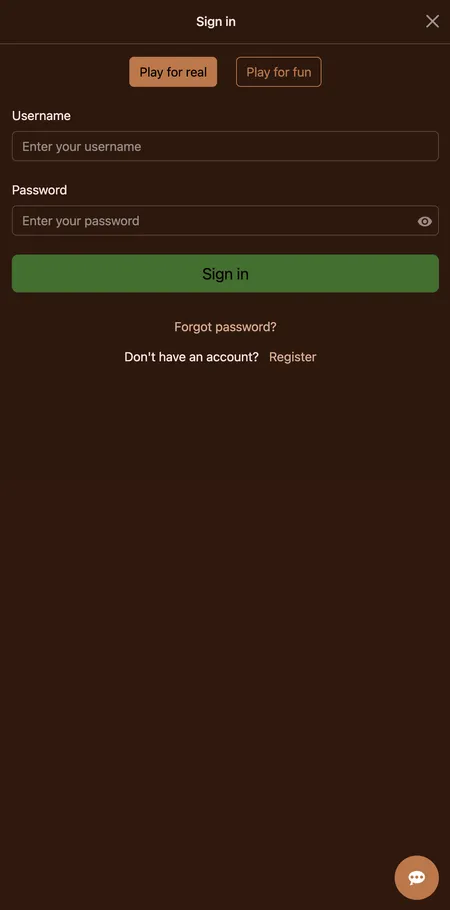
  1. Cocoa Casino login form on screen

    Open the Cocoa Casino website in your browser. In the top-right corner of the header you will see the Login button. Click it to open the login form. Enter your registered email address in the first field and your password in the second. Double-check for typos - the password field is case-sensitive. Click the confirmation button to submit. If credentials are correct you are redirected straight to the lobby with your balance visible.

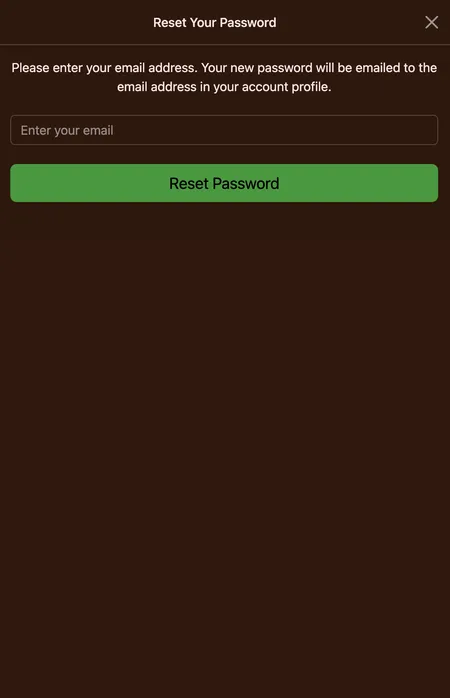
  2. Password reset form with email field

    If you cannot recall your password, click the 'Forgot Password' link directly below the password field. Enter the email address tied to your account and submit the form. A reset link arrives in your inbox - follow it, set a new password and return to the login form. Check your spam folder if the email does not arrive within a few minutes.

Go to Cocoa Casino

Finding the Login Button on Web and Mobile

On desktop the Login button sits in the top-right corner of the page header, next to the Register button. It is visible on every page of the site - home, games lobby, promotions - without scrolling.

On mobile the layout adapts to a condensed header. The Login button remains in the header area; on smaller screens it may appear as a text link or compact button depending on browser width. No menu navigation is needed - it is always one tap away.

If you land on the site and the header shows your username and balance, you are already logged in from a previous session. In that case, no action is needed.

The Login Form: What Each Field Does

The Cocoa Casino login form has two input fields plus a recovery link:

  • Email address - the address you used during registration; not your username or phone number.
  • Password - the password you set at signup; case-sensitive, minimum length applies.
  • Forgot Password link - triggers an email reset flow; no security question is required.

There is no CAPTCHA displayed by default, but repeated failed attempts may trigger additional checks. Make sure your browser is not auto-filling an old password from a different account.

Login form fields at Cocoa Casino

The login form shows email and password fields with a recovery link below. The form is identical on desktop and mobile browsers.

Logging In via Mobile Browser

Cocoa Casino is optimised for mobile play without a downloadable app. Open your preferred mobile browser - Chrome on Android or Safari on iOS both work reliably - navigate to the site and tap Login in the header.

The form scales to your screen size automatically. Autofill from your browser's password manager works normally. Once authenticated the full lobby loads: games, promotions, banking and your account dashboard are all accessible.

160 games are confirmed available in the mobile browser, with identical bonuses and withdrawal tools compared to desktop. Sessions persist across page navigation within the same browser tab.

For more detail on the mobile experience, see the Cocoa Casino mobile page.

Play on Mobile

Recovering Access to Your Account

If you have forgotten your password, the reset process is straightforward:

  1. Click 'Forgot Password' on the login form.
  2. Enter the email address linked to your account.
  3. Check your inbox for a reset link - typically arrives within a few minutes.
  4. Click the link, enter a new password, confirm it.
  5. Return to the login page and sign in with the new credentials.

If you no longer have access to the registered email address, contact support via live chat (available 24/7) or email. Identity verification will be required before the team can update account details.

Tip: support operates around the clock but the KYC verification team works Monday to Friday only. Account-level changes may take longer over weekends.

Password reset emails are sent instantly in most cases. If nothing arrives after 5 minutes, check your spam or junk folder before contacting support.

Login on Different Devices

Cocoa Casino does not lock sessions to a single device. You can log in from a desktop browser at home and a mobile browser on the go without any conflict. Active sessions on multiple devices simultaneously are generally supported.

Device type Login method Notes
Windows/Mac desktop Chrome, Firefox, Opera Full lobby access
iPhone/iPad Safari, Chrome Mobile-optimised layout
Android phone/tablet Chrome, Firefox Same features as desktop
Smart TV / console Not tested Not officially supported

Clearing browser cookies or using private/incognito mode will end the session and require a fresh login.

Session Persistence and Auto-Login

If you leave the site without clicking Logout, most browsers will keep the session active until the cookie expires. The next time you open the site in the same browser you will already be logged in.

Sessions do not persist if you:

  • Use a different browser or device
  • Clear cookies or site data
  • Open an incognito/private window
  • Manually log out

There is no explicit 'Remember Me' checkbox on the Cocoa Casino login form, but standard browser session cookies handle persistence in practice.

Ready to play? Your account is one click away - log in and check your current bonuses and balance.

Common Login Problems and Fixes

Most login issues fall into a handful of categories:

Wrong email or password. The most frequent cause. Try copy-pasting instead of typing. Passwords are case-sensitive; Caps Lock is a common culprit.

Account not yet verified. After registration an email verification link is sent. Until you click it the account may be inactive. Check your inbox for the verification email.

Browser cache conflict. Old cached data occasionally breaks the login page. Clear browser cache and cookies, then try again.

Network or VPN issue. If your IP is flagged or you are using a VPN in a restricted region the form may not submit. Disable VPN and retry.

Country restriction. Cocoa Casino restricts access from certain territories. If you are in a blocked country the login may be prevented at network level.

If none of the above resolves the issue, live chat support is available 24/7 and can escalate to the technical team.

Cocoa Casino does not hold a UKGC licence. Players from the UK should review local regulations before creating or accessing an account.

After Login: What You Can Do

Once authenticated, your account dashboard gives access to:

  • Balance display - real-money and bonus balance shown separately
  • Transaction history - deposits, withdrawals and bet records
  • Banking / Cashier - deposit via Visa, Mastercard, Skrill, Neteller, Bitcoin and other methods; withdrawal requests with a weekly limit of 500 GBP
  • Promotions - activate bonus codes, view current offers, check wagering progress
  • Responsible gambling tools - deposit limits, session timers and self-exclusion settings
  • COMP points tracker - 1,000 points convert to 1 USD with no additional wagering
  • KYC document upload - required before any withdrawal is processed

Withdrawal requests under 100 USD minimum are not processed. Plan your first cashout around the KYC timeline: internal verification takes 48 to 72 hours and the team operates Monday to Friday.

Login, KYC and Withdrawals

An authenticated session is the starting point for identity verification. Cocoa Casino requires KYC documents before releasing any withdrawal - a government-issued photo ID, proof of address dated within 3 months, and a Card Authorization Form if you deposited by card.

You can upload documents through your logged-in account dashboard. Submitting them early - ideally at registration - avoids delays when you place your first withdrawal request. Once verified, the status stays active as long as your personal details do not change.

Account Security Recommendations

  • Use a unique password for Cocoa Casino - not shared with email or other sites.
  • Avoid logging in on public Wi-Fi without a VPN.
  • Log out when using shared or public devices.
  • Monitor your registered email for unexpected login notifications.
  • If you notice unfamiliar activity, contact support immediately to freeze the account.

All traffic between your browser and the platform is protected by 256-bit SSL encryption. RNG outcomes are periodically audited by independent third parties. The platform does not publicly confirm a standalone 2FA implementation; standard protection relies on password plus email verification.

Logging Out Properly

Click your username or account icon in the header and select Logout. This ends the session on the current device only. If you are logged in on multiple browsers or devices simultaneously, each session must be ended separately.

There is no single 'log out everywhere' button confirmed in the interface. If you suspect unauthorised access, change your password immediately - this will invalidate existing sessions.

Login FAQ

What do I use to log in - email or username?

You log in with the email address you registered with. Your username is for display purposes; it is not the login identifier.

I forgot my password. What now?

Click 'Forgot Password' on the login form, enter your registered email and follow the reset link sent to your inbox. Check spam if it does not arrive within 5 minutes.

My account is locked after multiple failed attempts. How do I unlock it?

Contact live chat support, available 24/7. The team can unlock the account after verifying your identity.

Can I stay logged in on my phone permanently?

Browser sessions persist until cookies are cleared or you log out. There is no permanent auto-login, but most mobile browsers keep the session active between visits.

Does Cocoa Casino have 2FA?

A standalone two-factor authentication feature is not publicly confirmed. The standard security layer is your password combined with email verification.

Can I be logged in on desktop and mobile at the same time?

Yes, simultaneous sessions on different browsers or devices are generally supported.

The login button is not loading. What should I try?

Clear your browser cache and cookies, disable any VPN or ad-blocker, try a different browser. If the issue continues, live chat support can help diagnose it.

I registered but cannot log in. Why?

Check that you have clicked the email verification link sent at registration. Without that step the account may remain inactive.

Can I change my login email address?

Email address changes require contacting support and passing identity verification. You cannot update this directly in the account dashboard.

Is login safe on a mobile browser?

Yes. The same 256-bit SSL encryption applies on mobile. Avoid public Wi-Fi without a VPN as a general precaution.

What happens to my bonus if I log out mid-session?

Bonuses and wagering progress are saved server-side. Logging out and back in does not affect your bonus balance or progress counter.

Where do I find the deposit section after logging in?

The Banking or Cashier section is accessible from your account dashboard or the main navigation. It contains both deposit and withdrawal tools.